Saturday, 2 July 2011

DreamBoard


Update : Version 1.1.4


V1.1.4


Fixed IOS5 beta 2 crash


Download 1.1.4 HERE


This software give you the full control on the SpringBoard , now you can place anything from the Widgets to Apps on SpringBoard. Now you can switch between any theme just with in few clicks. Now there is no need to respire the SpringBoard to activate the new theme , every theme will get the immidiate effect.


Display Recorder


Update : Version 1.2.0


What’s New in Display Recorder v1.2.0
  • Avi files record
  • Youtube videos uploading at your iDevices
  • On iPad, Live view support
  • H.264 recording support on iPhone and iPad having firmware iOs 4.3
  • Framerate adjustable
  • Display record in real times
  • Fixed bugs

Latest Changes
  • iOS4.3 support
  • Experimental support for recording in H.264 on iPhone 4 and iPad
  • Live view support for iPad

Download 1.2.0 HERE


Display Recorder lets record your iPhone display activity and save videos as .avi files you can publish to Youtube within the app or browse from your desktop browser using the built in web server. The app is very complete and full of options: you can setup custom activation gestures, enable OpenGL capture, choose video quality and orientation, enable taps and adjust the framerate. You can setup all these preferences from the Display Recorder tab in Settings.app.

The videos are in the directory: / User / Library / Keyboard / DisplayRecorder and you can upload it to YouTube Directly application, display Recorder . In the application down below will appear in more than a URL to be able to see and download videos from your PC, just by the WebServer. 

CallTell for 3GS and i4

Update : Version 3.1


V3.1
  • Fixed Volume HUD from popping up
  • Bluetooth route sometimes not working
  • Call from a blocked number would crash the phone
  • Phone wouldn't ring on certain settings
  • Reads phone numbers properly, not as one big number
  • Can choose what to say when number isn't in contacts (Read number, or say "Unknown Caller") 
Download 3.1 HERE


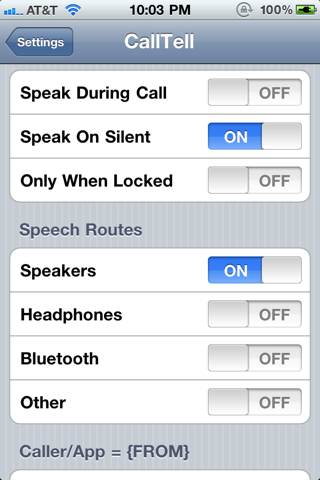
it speaks the name of who’s calling you before your iPhone 4 or 3GS rings. It also works for SMS messages! The app will read the SMS messages that are received out loud. You can toggle (enable/disable) features within the Settings.app, and CallTell takes the volume from the mediaplayer to determine how loud it speaks.

Barrel

Update : Version 1.5.7-1 

v1.5.7

  • Added new mode: Pac-Man
  • Compatibility fixes


        Download 1.5.7-1 HERE


        Requires iOS 4.0+, NOT FOR iPad.

        This tweak adds a 3D "cube" effect to your icon pages, similar to Compiz on Linux. In the tweak's settings, you can customize the effect to have the icons appear as if you're either inside or outside of the cube.

        Configure options from your Settings app. No new icons will be added to your home screen.

        NOT compatible with SBRotator 

        BackLiter


        Update : Version 1.5.1


        1.5-1
        *Added separate settings for backlight levels when charging
        *Fixed code-signing bug causing startup crash on some phones 

        Download 1.5.1 HERE


        A new one-touch utility app for controlling your phone's backlight levels. If you're the hard-core iPhone user, you try to get everything you can out of your hardware. That means keeping your screen dim when you don't need it bright, to save battery life. But, what happens when you move outside, and the ambient light swamps your display? Or you're in the car? And what happens, when you want to change the screen brightness quickly, and don't want to spend the time, or attention, to navigate multiple touches, and potentially a slider that's difficult to control precisely, even when you're sitting still?

        Enter Backliter, a new app for iPhone from Enscand, Inc. Backliter is the simplest, most efficient backlight control imaginable. You use your device Settings to preset two brightness levels. One dim, one bright. Then, when you run the app, with one touch, the app toggles your screen brightness between those two levels. The app tells you what it's doing, and then closes itself. Literally, one touch!

        You can even set your preferences so that the app doesn't even take the time to show you the message. It just starts, changes brightness, and quits. It can't get any faster.

        Save yourself a few seconds of aggravation, a few times a day, for the life of your iPhone. We don't encourage you to use your phone while driving, but if you're trying to view Maps while waiting at a red light, you want to make your screen bright ASAP, see your maps clearly, and be done before that light goes green.

        Backliter's change is temporary. When your phone's springboard (home screen) restarts, after unlocking your phone, your normal iPhone screen brightness level will return. This app is for when you want your screen bright for what you're doing right now, but then want to save battery the rest of the time. 

        App Switcher Brightness


        Update : Version 1.2 

        Download 1.2 HERE


        Make the Switcher complete!

        Brightness Switcher either replaces the Volume Slider in the Switcher with a Brightness Slider or adds a Brightness Slider.
        Apple added a Volume Slider to the Switcher in iOS 4.2. But your devices have already hardware volume buttons. Why not use the space for something more reasonable? That's what Brightness Switcher does.
        You'll find settings in the Preferences.app.
        Compatibility

        Friday, 1 July 2011

        AndroidLock XT


        Download 2.3 HERE


        v2.3
        • Fixed security hole
        • Removed warnings when AndroidLock XT is disabled
        AndroidLock XT is an enhanced version of AndroidLock with the following features:

        * Customizable appearance and themes
        * Enable/Disable switch
        * Tap/Slide to unlock (AndroidLock is minimized)
        * Compatible with LockCalendar, LockInfo and Cydgets
        * Max attempts limit
        * Emergency call
        * Can be set to require pattern only after some time


        SECURITY CONSIDERATIONS
        AndroidLock provides an alternative way to unlock your phone.
        It is enough secure for most users but if security is critical for your needs then you should use the standard Passcode.


        THEMES
        To create your own themes, see the "Theme creation guide" in
        /var/mobile/Library/AndroidLock/Doc